 Thingiverse
Randomized Hex Snowflakes with BlocksCAD
door bitwi
12
Downloads
16
Likes
0
Makes
Randomized Hex Snowflakes with BlocksCAD
====
Working in [BlocksCAD ](https://www.blockscad3d.com/) was fun and a pleasure. I especially like that it is based on [OpenSCAD](http://www.openscad.org/), which is what the [Thingiverse Customizer](https://www.thingiverse.com/customizer) uses!
The files for this Thing include 12 example snowflakes, and the BlocksCAD XML file.
Here's how to load this snowflake program into BlocksCAD and generate your own snowflakes.
1. Download the `Randomized Hex Snowflake.xml` file.
2. Open the [BlocksCAD Editor](https://www.blockscad3d.com/editor/)
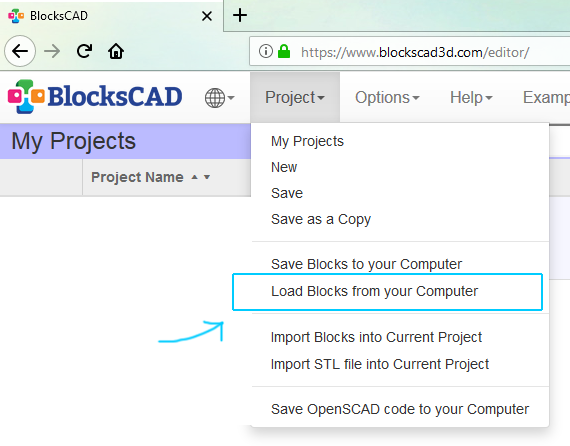
3. `Project -> Load Blocks from your Computer` to load/import the XML file
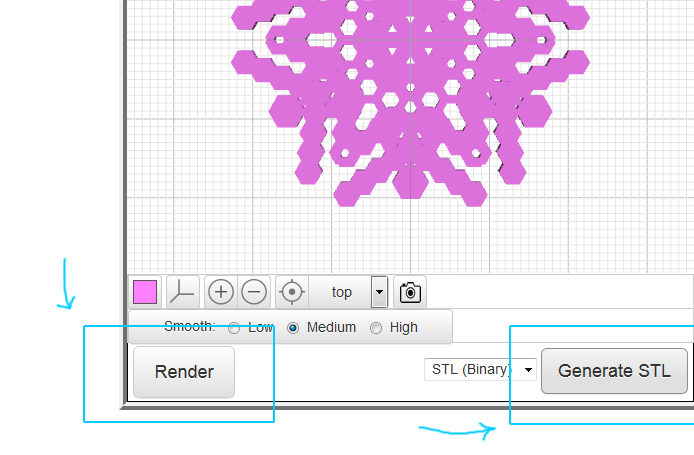
4. Click the `Render` button until you see a snowflake you like, then click the `Generate STL` button to download it!
Thank you! And enjoy! :)
====
Working in [BlocksCAD ](https://www.blockscad3d.com/) was fun and a pleasure. I especially like that it is based on [OpenSCAD](http://www.openscad.org/), which is what the [Thingiverse Customizer](https://www.thingiverse.com/customizer) uses!
The files for this Thing include 12 example snowflakes, and the BlocksCAD XML file.
Here's how to load this snowflake program into BlocksCAD and generate your own snowflakes.
1. Download the `Randomized Hex Snowflake.xml` file.
2. Open the [BlocksCAD Editor](https://www.blockscad3d.com/editor/)
3. `Project -> Load Blocks from your Computer` to load/import the XML file

4. Click the `Render` button until you see a snowflake you like, then click the `Generate STL` button to download it!

Thank you! And enjoy! :)
Heb je dit model geprint? Inloggen en deel je make!
Log in om een reactie achter te laten
InloggenNog geen reacties – wees de eerste!
